Moduleur User Guide
v1.0 — 2026Overview
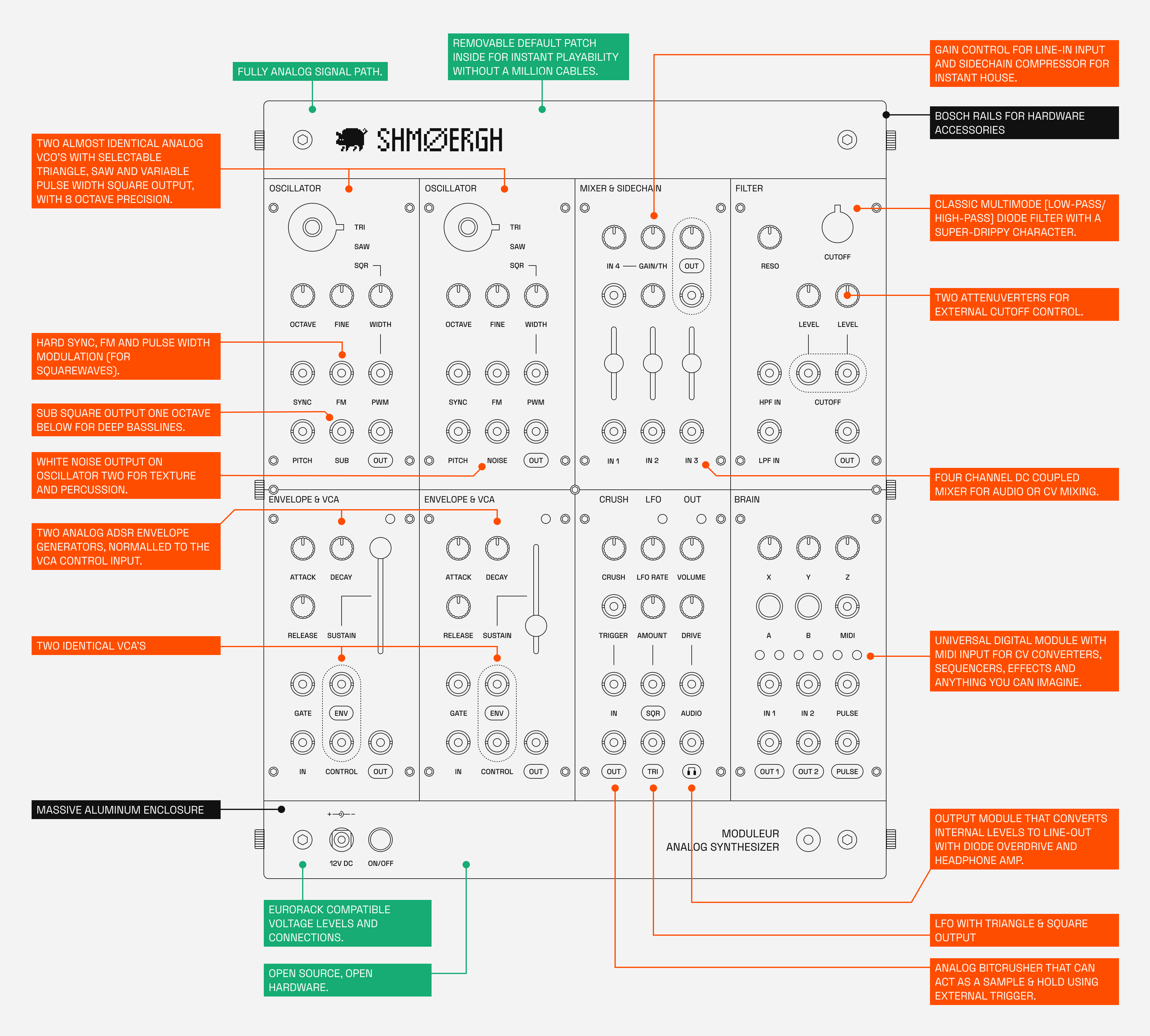
The Shmøergh Moduleur is a starter kit to modular synthesis, a rabbit hole to sound design and a gateway to hardware hacking. It's a complete standalone instrument as well as a flexible set of Eurorack-compatible modules.
What's Inside
- Two oscillators with FM, hard sync and extra sub and noise outputs
- A 4 channel mixer with sidechain compressor
- A super drippy diode-ladder filter
- Two ADSR envelope generators & two VCA modules
- Analog Bitcrusher, LFO and output module with line-out and headphones amp
- An universal Brain for MIDI to CV conversion, sequencing and whatever digital nonsense
Key Features
- 100% analog audio: All audio processing is done through classic analog circuits which gives a raw but warm character.
- Eurorack compatible: Each module follows standard Eurorack conventions (±12V rails, reverse polarity protection, 10-pin power, 1V/octave tracking). Each module is 12HP and can be removed from the case and used in any Eurorack system.
- Flexible configuration: Use the pre-patched default configuration for immediate play, or patch freely to explore creative sound design.
- Fully open source: All schematics, PCB designs, firmware, and mechanical designs are freely available for modification and extension.
- Hackable Brain module: Powered by Raspberry Pi Pico, the Brain can be programmed with custom firmware using C++ or MicroPython.
- All housed in a massive aluminum enclosure built around standard Bosch rails for future hardware extensibility.
Product Notice
POWER REQUIREMENTS
This instrument requires an external SELV-rated DC power adapter.
Supported input range: 9–36V DC
Recommended: 12V DC, center-positive polarity
Minimum current rating: 1A
The USB-C connector is provided exclusively for firmware updates of the Brain module. The instrument cannot be powered via USB. It must always be powered using the external DC power adapter as specified in the Power Requirements section. Only connect the USB port to a standard computer USB port when performing firmware updates.
Do not connect the USB port to:
- USB power adapters
- USB chargers
- power banks
- unknown or non-compliant USB devices
Improper use of the USB port may result in malfunction or damage not covered by warranty.
WARRANTY
This instrument comes with a 1-year limited warranty for private customers within the European Union, in accordance with applicable EU consumer law. The warranty covers manufacturing and material defects under normal, intended use.
The warranty does not cover damage resulting from:
- incorrect or incompatible power supply
- misuse, negligence, or operation outside the intended purpose
- modifications, repairs, or alterations performed by the user or third parties
- damage caused by external equipment or environmental factors
- use of incorrect polarity or non-compliant power supplies
For business customers (B2B sales), warranty terms may differ.
INTENDED USE
This instrument is designed to operate both as a standalone synthesizer and as part of a Eurorack-compatible modular system. All control voltages and audio signals follow standard Eurorack voltage levels and conventions. When used in standalone mode, the instrument must be powered using a compatible external DC power adapter within the specified input range.
Any use outside of these electrical and operational specifications is considered non-intended use. The manufacturer is not responsible for damage resulting from operation outside the intended purpose.
LIMITED RUN & RESALE
This instrument is produced as a limited-run, boutique product. Any resale, transfer of ownership, or modification after purchase is carried out at the new owner’s responsibility. The manufacturer cannot guarantee the condition, compliance, or performance of the product after resale or modification by third parties.
EXPORT & INTERNATIONAL USE
This product is placed on the market within the European Union. If exported or used outside the EU, compliance with local regulations becomes the responsibility of the owner.
Unauthorized modification of the product may void warranty and regulatory compliance.
Getting started
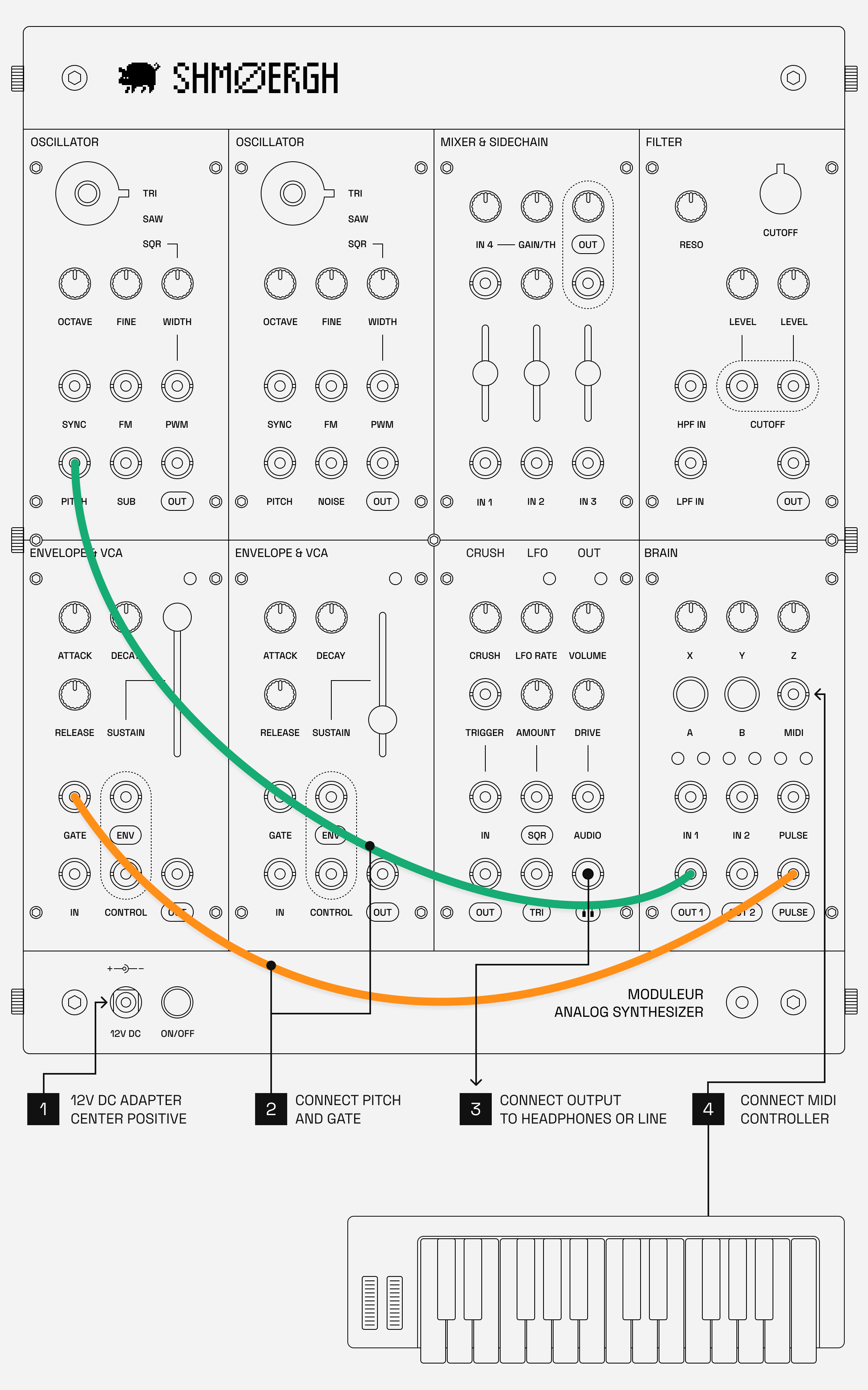
Turn on
Plug in a 12V DC, center positive SELV-rated adapter in the power connector, and push the power button. Make sure to wait about 20-30 seconds before starting to play to let all modules warm up. The VCOs might even need 5-10 minutes to completely warm up for their final 1V/oct tracking. Analog stuff.
Play
The Moduleur's Brain module comes with a default firmware called Le Controlleur, which has two modes: a Sequencer mode which allows you to play the Moduleur without any external gear, and a MIDI to CV converter that lets you connect a MIDI controller to the Moduleur.
(Note: of course if you're using another firmware on the Brain this won't work. If you want to restore your firmware to Le Controlleur, you can download it from the Brain Firmwares page.)
Playing the built in Sequencer
- Patch
Brain / Pulse OuttoEnvelope 1 / Gate - Patch
Brain / Out 1toVCO 1 / Pitch - Connect your headphone or line out to
Out / 🎧 - Press
Brain / Button A - Start turning
Brain / Pot Z - Enjoy
What's going on here? Read more about it in Le Controlleur user guide
Playing with a MIDI controller
- Patch
Brain / Pulse OuttoEnvelope 1 / Gate - Patch
Brain / Out 1toVCO 1 / Pitch - Connect your headphone or line out to
Out / 🎧 - Connect a MIDI controller to
Brain / Midi In - Enjoy
Note: Brain uses a TRS-A 3.5mm MIDI connector so make sure your cable or adapter is correct.
Read about MIDI settings in Le Controlleur user guide.
Power Requirements
This instrument requires an external SELV-rated DC power adapter.
- Supported input range: 9–36V DC
- Recommended: 12V DC, center-positive polarity
- Minimum current rating: 1A
The use of incorrect polarity or non-compliant power supplies may result in damage not covered by warranty.
Default Patch Configuration
Inside the Moduleur there's a default connection that provides pre-wired connections between modules, allowing you to start making sounds immediately without a million cables. This configuration creates a traditional subtractive synthesis signal path:
Oscillators -> Mixer -> Filter -> VCA (controlled by an Envelope generator) -> Output.
Additionally the LFO and the 2nd Envelope generator is defaulted to the CV inputs of the Filter.
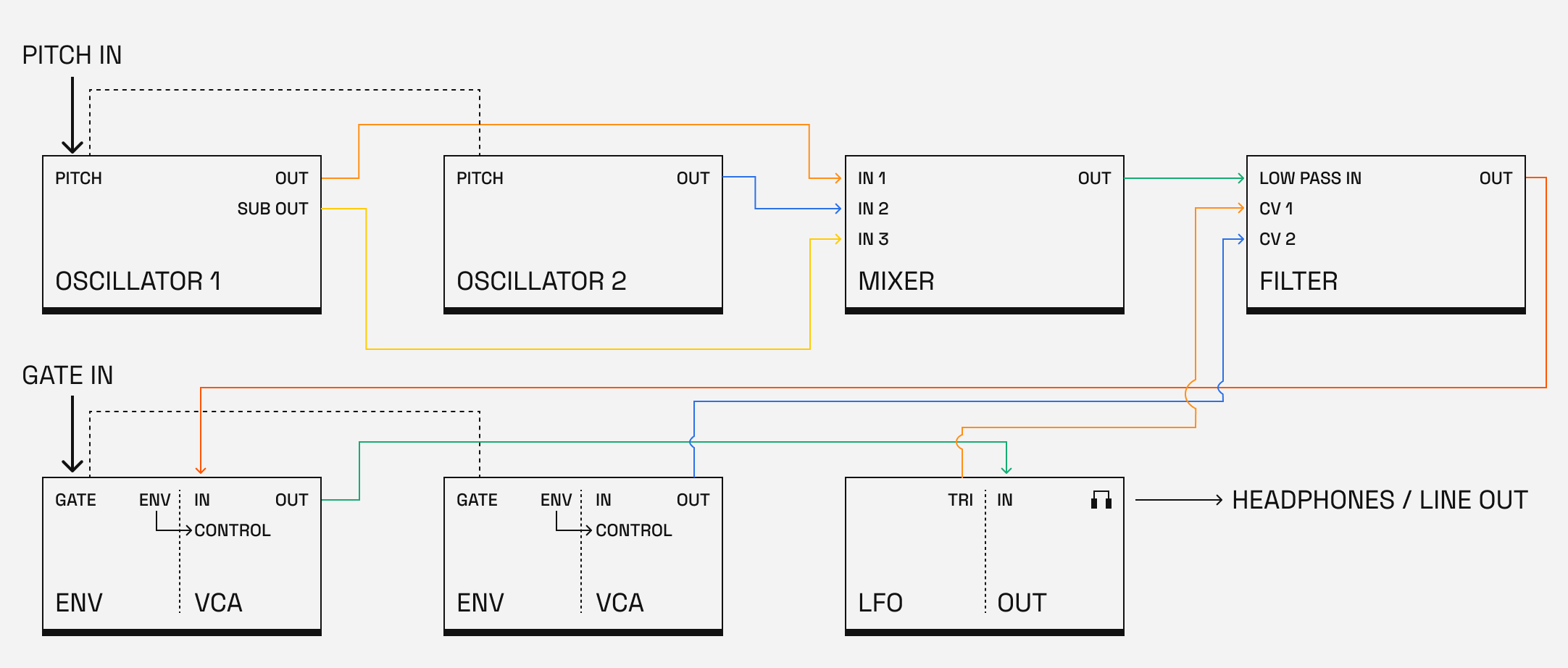
The default connection is practically the same as if you patched the setup below:
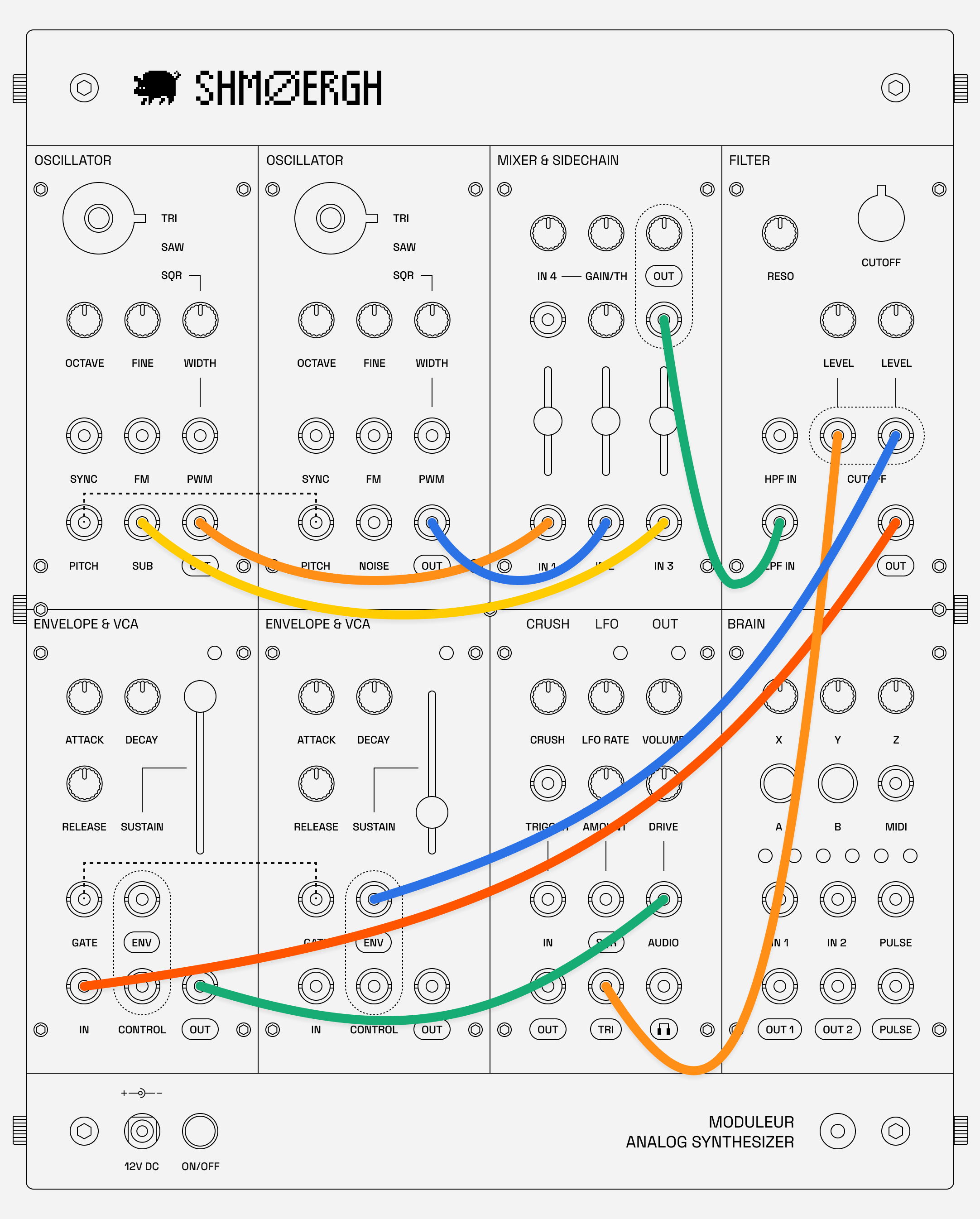
Patching
Patching means you start connecting cables between inputs and outputs, altering the signal path. This is where the fun begins.
The default connection for a jack is automatically broken when you insert your own cable. The labels with rounded border show outputs, the regular labels show inputs on the front plate. For example the GATE on the Envelope & VCA module is an input, whereas the ENV is an output.
We generally recommend connecting INPUTS with OUTPUTS. Although the system is protected against INPUT <-> INPUT and OUTPUT <-> OUTPUT connections usually there's no audible result of these and we recommend avoiding it.
Levels
The modules of the Moduleur work on Eurorack internal levels:
- Audio levels: 10Vpp
- Control voltages: 0-10V
Moduleur’s internal audio signals operate at Eurorack levels, which are significantly higher than standard line level.
Always use the Output module’s “OUT” jack to convert the internal signal to proper line level before connecting to mixers, audio interfaces, speakers, or other studio equipment.
Oscillators
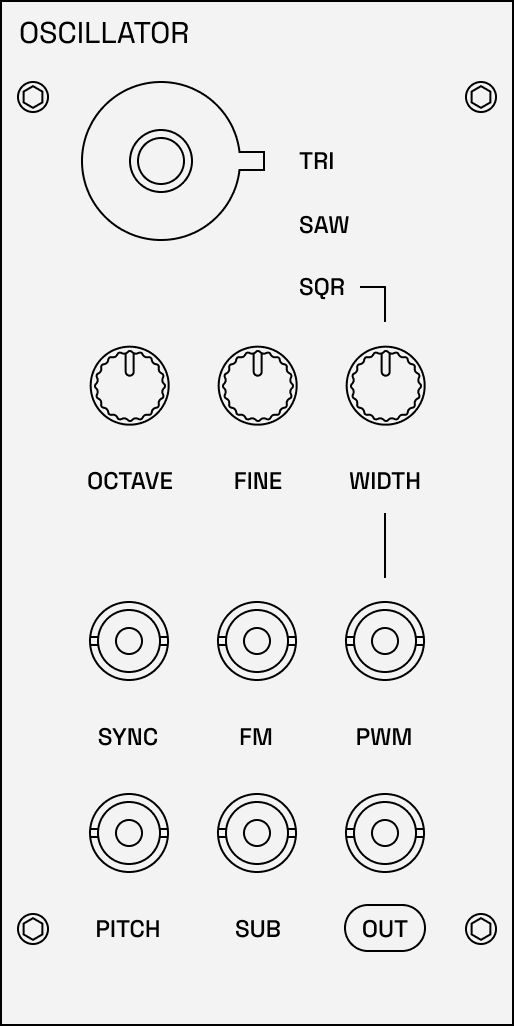
There are two almost identical voltage controlled oscillator modules in the Moduleur. These VCOs are the primary sound sources of the system. Each generates a waveform and offers about 7-octave precision tracking for accurate musical tuning.
VCO 1 has a SUB output which is a square wave one octave below the main frequency for added bass weight.
VCO 2 has a NOISE output which you can use to add character to the sound or use it as a modulation source.
A note on pitch
The Moduleur is an analog synth which means the audio is generated via components like resistors, transistors, capacitors. Each of these components are imperfect and therefore the audio of the Moduleur will not be perfect ever.
The VCO’s of the Moduleur generate analog waves. These waves have their limits when it comes to pitch preciseness: from our tests, the VCO should be in tune through about 6-7 octaves in room temperature, above that the pitch is getting slightly flat. Two notes:
- VCO’s need about 10 minutes of warm up time to completely get in tune
- VCO’s might get out of tune when used in extreme temperature (cold or hot)
Features
- Outputs: Selectable triangle, sawtooth, square waveforms
- 7-octave precision: Accurate 1V/octave tracking across a wide frequency range
- PWM (Pulse Width Modulation): Variable pulse width on the square wave output, modulatable via CV input
- FM (Frequency Modulation): Linear frequency modulation input for creating complex, harmonic-rich tones
- Hard Sync: Sync input allows one VCO to reset another's waveform for classic sync sounds
Controls
- Octave: Sets the base frequency of the oscillator
- Fine tune: Precision frequency adjustment for tuning and detuning
- PWM knob: Adjusts pulse width of the square wave output
- FM amount: Controls the depth of frequency modulation
Inputs & Outputs
- Pitch: Primary pitch control input with 1V/octave standard (typically from MIDI-to-CV or keyboard)
- FM In: Frequency modulation input (audio rate or control voltage)
- PWM In: Pulse width modulation CV input
- Sync In: Hard sync input from another (controller) oscillator, makes the oscillator follow the pitch of the controller
- Out: Outputs the selected waveform
- Sub (Oscillator 1): One octave below the main frequency for added bass weight
- Noise (Oscillator 2): White noise for percussion, wind effects, or adding texture
Usage Tips
- Use the two VCOs together with slight detuning for thick, chorus-like sounds
- Patch one VCO into the
FMinput of another for complex, metallic timbres - Experiment with connecting one VCO's output to the hard sync input of the other for aggressive lead sounds and screaming effects
- Modulate
PWMwith an LFO or envelope for evolving, animated textures
Mixer / sidechain compressor
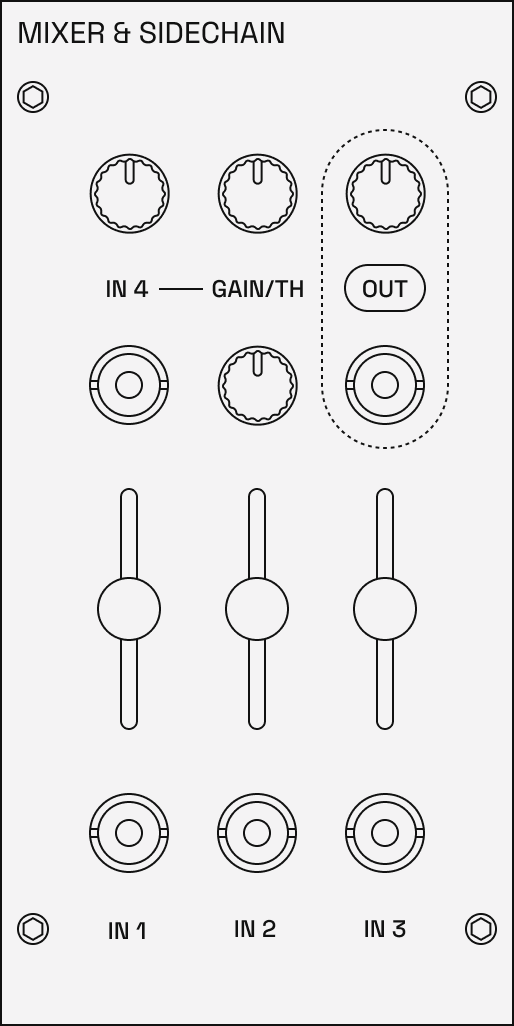
The Mixer module combines multiple audio or control signals into a single output. It features a built-in sidechain compressor for dynamic processing and ducking effects.
Features
- 4-channel mixer: Four independent input channels with level controls
- DC-coupled: Can mix both audio and control voltage signals
- Channel 4 pre-amp: Channel 4 has a built-in pre-amp that allows to gain lower level inputs (e.g. line-level) to Eurorack levels, which is what the rest of the system works with. This allows mixing external sound sources with the internal ones provided by the Moduleur.
- Built-in sidechain compressor: The mixer has a sidechain compressor that automatically reduces the mixed level of channel 1-3 based on the input of channel 4. Use the gain knob to increase the level of channel 4 and threshold knob to set the strength of the sidechain effect. A typical usage of the sidechain compressor is to connect a kick on channel 4 to create a ducking effect which is essential to any cool house or techno track. Note that you can use the sidechain even with turning channel 4 all the way down, so it's not part of the main output.
Controls
- Channel Level (1-4): Sets the level for each input channel
- Out Level: Overall output level control
- Channel 4 Gain: Sets the pre-amp level of channel 4.
- Threshold: Controls the depth of sidechain compression
Inputs & Outputs
- Channels 1-4: Four independent audio/CV inputs, channel 4 acts as the trigger input for the sidechain compressor.
- Mix Out: Combined output of all channels
Usage Tips
- Mix multiple oscillator waveforms to create complex timbres
- Use the sidechain compressor for classic ducking effects (e.g., kick drum ducking a bass line)
- Since it's DC-coupled, you can also mix control voltages to create complex modulation sources
Filter
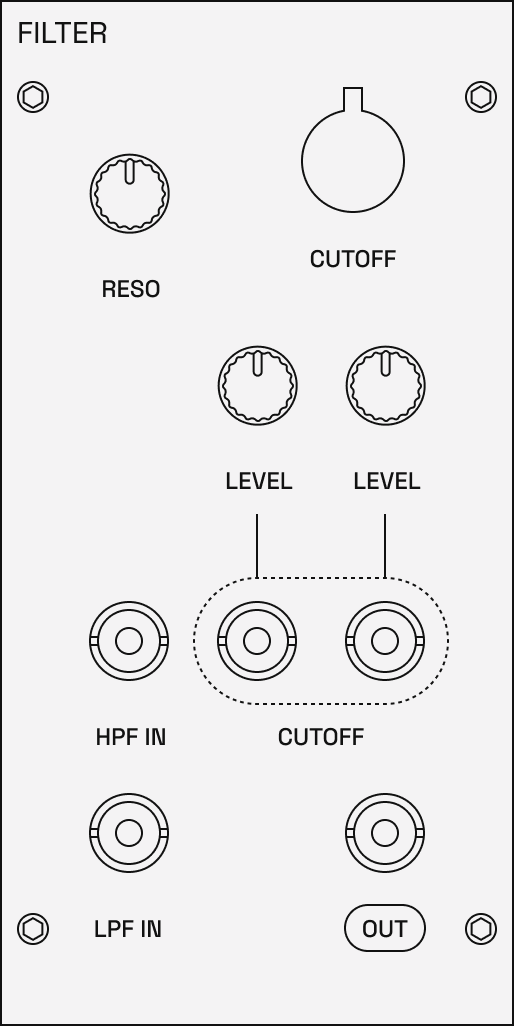
The filter is usually the heart of any synth and it's no different in the Moduleur too. It defines the main character of the instrument by removing or emphasizing certain frequencies. The Moduleur's classic diode filter is warm, it keeps the low-end even with high resonance. It's very analog.
Features
- Diode-ladder design: Based on classic topology
- Cutoff: Cutoff frequency can be modulated by external CV sources
- Resonance control: Emphasize frequencies at the cutoff point, up to self-oscillation
- Multiple filter modes: Low-pass and high-pass
- CV inputs: two independent control voltage inputs with attenuverters
Controls
- Cutoff: Sets the filter cutoff frequency
- Resonance: Controls emphasis at the cutoff frequency
- CV Amount: Attenuator for the cutoff modulation input
- Mode selector: Switches between low-pass, high-pass, band-pass, and notch modes
Inputs & Outputs
- LPF In: Main audio input for low-pass filter from sound sources (mixer, oscillators etc.).
- HPF In: Main audio input for high-pass filter
- CV 1 & 2: Cutoff frequency modulation inputs (typically from envelope or LFO). Each has an attenuverter to control the CV input level from -1 to 1, so you can invert the control signals.
- Out: Main filtered audio output
Usage Tips
- Use an envelope with a short decay to modulate the filter cutoff for classic analog bass synth sounds
- Push the resonance high for screaming, resonant sweeps
- At near-maximum resonance, the filter will self-oscillate and produce sort of a sine wave tone which can be an interesting sound or control voltage source
- Experiment with different filter modes for varied tonal characteristics
- Note: connecting the same input to
HPFandLPFat the same time will not result in a band pass filter.
Envelopes / VCAs
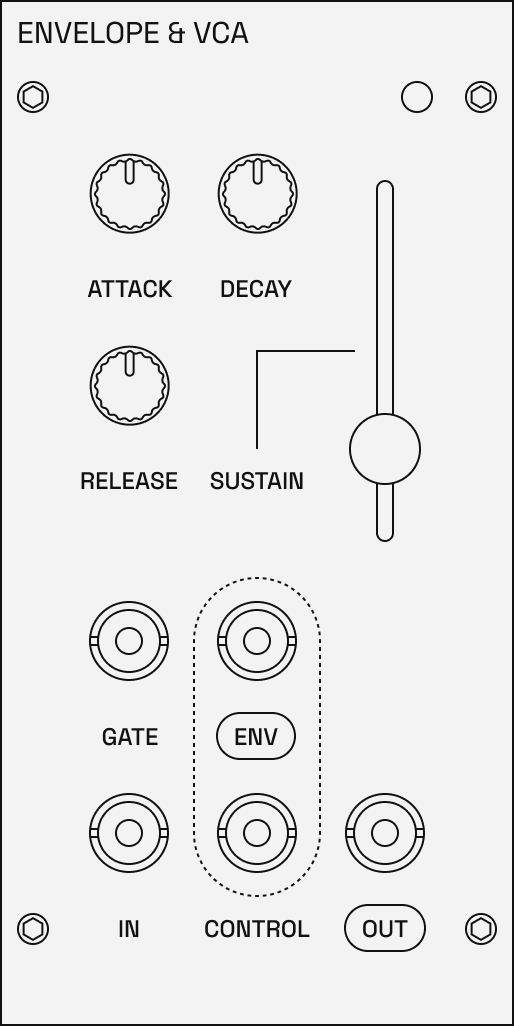
The Moduleur has two identical Envelope & VCA modules. As their name suggests: they combine an ADSR envelope and a voltage controlled amplifier in a single module. The envelope shapes the volume or modulation intensity over time, while the VCA applies that envelope to an audio or CV signal.
Features
- ADSR envelope: Attack, Decay, Sustain, and Release stages
- Wide time range: Envelope times from 50 microseconds to ~8 seconds
- Integrated VCA: Built-in amplifier controlled by default by the envelope
- Envelope output: CV output of the envelope for modulating other modules
Controls
- Attack: Time for the envelope to rise from zero to maximum when triggered
- Decay: Time for the envelope to fall from maximum to the sustain level
- Sustain: Level the envelope maintains while the gate is held
- Release: Time for the envelope to fall to zero after the gate is released
Inputs & Outputs
- Gate In: Trigger input to start the envelope
- In: Signal input to the VCA
- Control In: External control voltage for VCA level
- Envelope Out: CV output of the envelope signal
- VCA Out: Audio/CV signal shaped by the envelope
Usage Tips
- Use one ADSR to control volume (via VCA) and the other to modulate filter cutoff
- Short attack and decay times with zero sustain create percussive, plucked sounds
- Long attack and release create slow, pad-like evolving sounds
- Use the envelope output to modulate other parameters like pitch, PWM, or LFO rate
Bitcrusher / LFO / Output
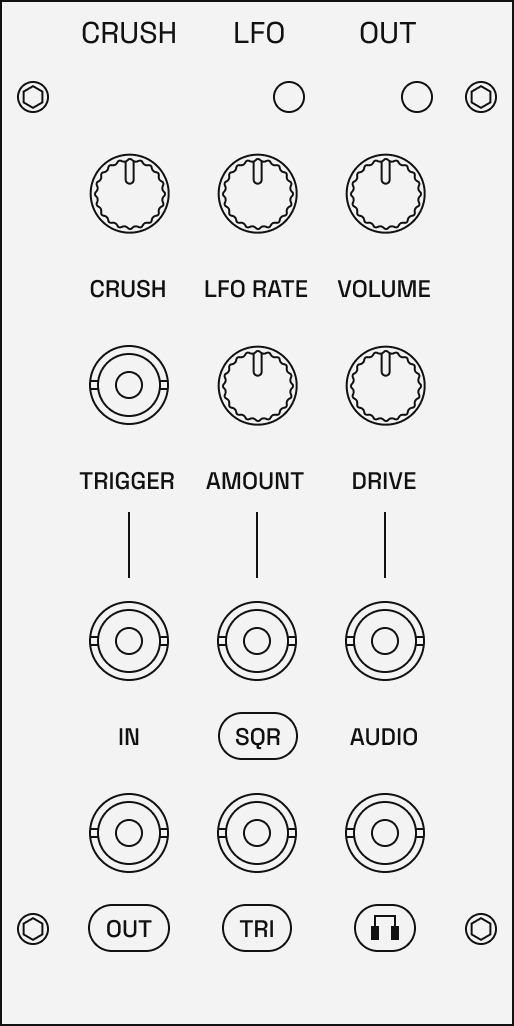
This multi-function module combines effects, utility functions and output capabilities in a single unit. It includes an analog bitcrusher that can double as a sample & hold circuit, an LFO with square and triangle output, and an audio output module with diode based overdrive.
Features
- Analog bitcrusher / sample & hold: Reduces bit depth for lo-fi, digital degradation effects. The effect can be used as a sample & hold module that can capture and hold voltage levels, creating stepped random or rhythmic modulation.
- Square/Triangle LFO: Low-frequency oscillator with dual waveform outputs
- Diode/LED overdrive: Analog distortion circuit for adding warmth and grit
- Headphone amplifier: Dedicated dual-mono headphone or line output.
Controls
- Crush: Adjusts the sample rate reduction of the bitcrusher. The higher you move the lower the bitrate.
- LFO Rate: Sets the speed of the LFO (low to medium speed range)
- Amount: Sets the level of the LFO
- Volume: Main output volume
- Drive: Controls the amount of overdrive
Inputs & Outputs
- Trigger: External source for the bitcrusher crush rate.
- Bitcrusher In: Audio input for bitcrushing
- Bitcrusher Out: Crushed audio/stepped voltage out
- LFO Square: Square wave LFO output
- LFO Triangle: Triangle wave LFO output
- Audio In: Main audio input for output stage
- Headphone Out: Dual-mono headphone or line-out jack
Usage Tips
- Use the bitcrusher on drums or synth lines for lo-fi, vintage digital-like textures
- Using the bitcrusher for sample & hold: feed noise into the bitcrusher's input for random stepped voltages, great for modulating pitch or filter cutoff. You can pair this with using an LFO on the
TRIGGERinput for very slow voltage changes. Or you can use the gate/pulse output of the Brain module or your external controller to trigger sampling. - Use the LFO to create vibrato, tremolo, or sweeping filter effects
- The overdrive adds analog warmth and can push signals into saturation for a thick fuzz.
Brain
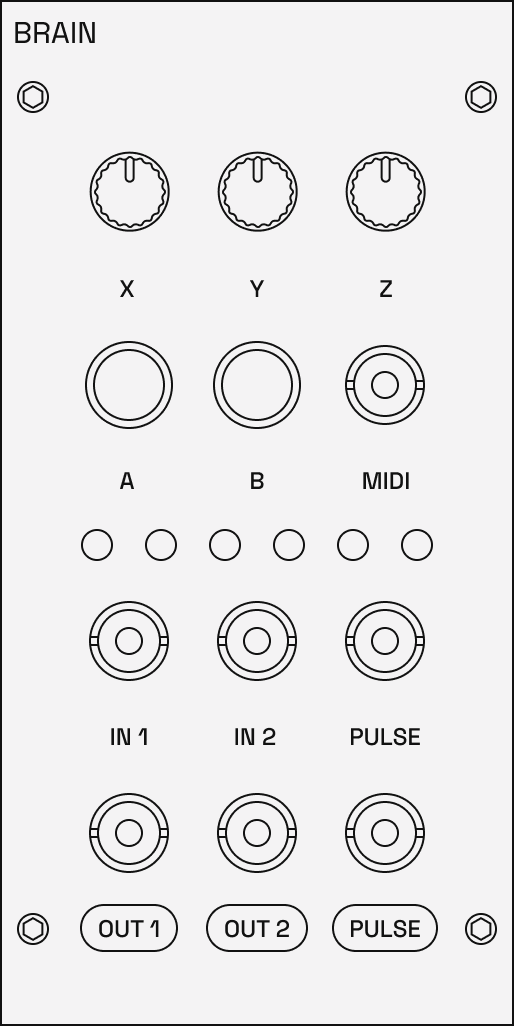
The Brain is a universal digital module with a few common controls like buttons, inputs and outputs. With its default firmware it provides MIDI-to-CV conversion so the Moduleur can be played with any MIDI controller. It's powered by the very popular a Raspberry Pi Pico (or Pico 2), and it has an exposed USB-C connector that allows you to update or write your own firmwares on it.
Features
- Raspberry Pi Pico powered: Uses RP2040 or RP2350 microcontroller
- Fully hackable: Program custom firmware with C++ or MicroPython using the Brain SDK
- Ongoing firmware updates: New features including sequencers, lo-fi effects, digital voices, utilities, and mini drum machines
- Two buttons: User interface for navigation and parameter control
- Three potentiometers: Assignable knobs for real-time control
Tuning the outputs
Brain outputs can generate audio or control voltage. Control voltages have to be extremely precise especially when used to set the pitch of the VCO's (our ears are just too sensitive). Since the Brain output is analog there can be imperfections without software calibration.
You can use the CV Tuner firmware to calibrate the CV output of the Brain module so it tracks precisely and your notes are always pitch perfect. The calibration is saved on the Brain board and is persisted through all official Shmøergh firmwares.
Inputs & outputs
- MIDI In: 3.5mm TRS-A MIDI input
- IN 1 / IN 2: Audio or CV inputs for processing/analysis
- OUT 1 / OUT 2: Audio or CV outputs
- Pulse in: Gate/trigger input
- Pulse output: Gate/trigger output
- 6 LEDs: for any system feedback
Firmwares
The Brain is a universal module. You can write or upload any firmware to it — sequencers, effects, utilities or any kind of digital nonsense.
It must always be powered using the external DC power adapter as specified in the Power Requirements section. Only connect the USB port to a standard computer USB port when performing firmware updates.
Do not connect the USB port to:
- USB power adapters
- USB chargers
- power banks
- unknown or non-compliant USB devices
Improper use of the USB port may result in malfunction or damage not covered by warranty.
Downloads
Downloads
Maintenance
The audio in the Moduleur is fully analog. We use a lot of discrete components like resistors, transistors, capacitors which are by nature imperfect, therefore the audio of the Moduleur will never be perfect. Unlike with digital synths, these imperfections are the main ingredients of the classic warmth of an analog sound.
We designed the Moduleur to require as little maintenance as possible. Ideally, the output of the Brain module is the only part that might need calibration every now and then.
Brain tuning
One of the main use cases of the Brain module is to provide pitch perfect 1V/oct voltage on its outputs for controlling the pitch of VCO’s (e.g. in the MIDI to CV converter mode of Le Controlleur firmware). This must be super precise because our ears are extremely sensitive to notes being out of tune.
Brain outputs are analog and such, they are not perfect. To compensate this they should be calibrated. The calibrated values are saved in the Brain module and persisted for all firmwares by Shmøergh. Note: you may lose the calibration if you upload third party firmwares.
All synths of the 1/1 Moduleur Series come with pre-calibrated Brain modules.
To calibrate the Brain outputs upload the CV Tuner firmware.
VCO pitch
Analog VCO’s are very sensitive and have their limits when it comes to pitch preciseness. From our tests, the Moduleur VCO’s should be in tune through ~6-7 octaves in room temperature. Above that the pitch is getting gradually flat. Note that VCO’s need about 10 minutes of warm up time to completely get in tune, and they might get out of tune when used in extreme temperature (cold or hot).
If you find your VCO’s out of tune you can tune them following the DIY tuning guide on Github.